If you have printed a document and you do not see your job listed on the printer, this may be due to the uniflow program frozen or not running on your computer.
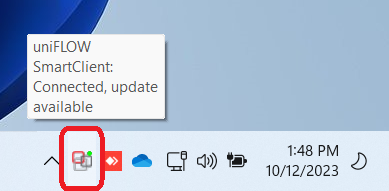
- You will be able to verify by locating the icon at the bottom right corner of your taskbar (windows computer) and selecting the '^' up arrow for additional icons. There should be an icon of two squad interconnected.
- If they are grayed out, it's lost the connection. You can either reboot your computer or re-establish the connection
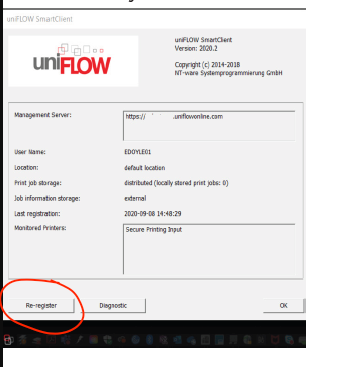
- Re-register by right-clicking on the icon and selecting 'About' and then select Re-register
- If they are grayed out, it's lost the connection. You can either reboot your computer or re-establish the connection
Was this article helpful?
That’s Great!
Thank you for your feedback
Sorry! We couldn't be helpful
Thank you for your feedback
Feedback sent
We appreciate your effort and will try to fix the article